
API token
An API token is your key to the Byl API. It is passed in the Authorization header on every request.
Creating a token
Section titled “Creating a token”- Sign in to the dashboard.
- Select your project and open Settings → API tokens in the left-hand menu.
- Give your token an easy-to-remember name (for example,
production-server,staging) and create it.
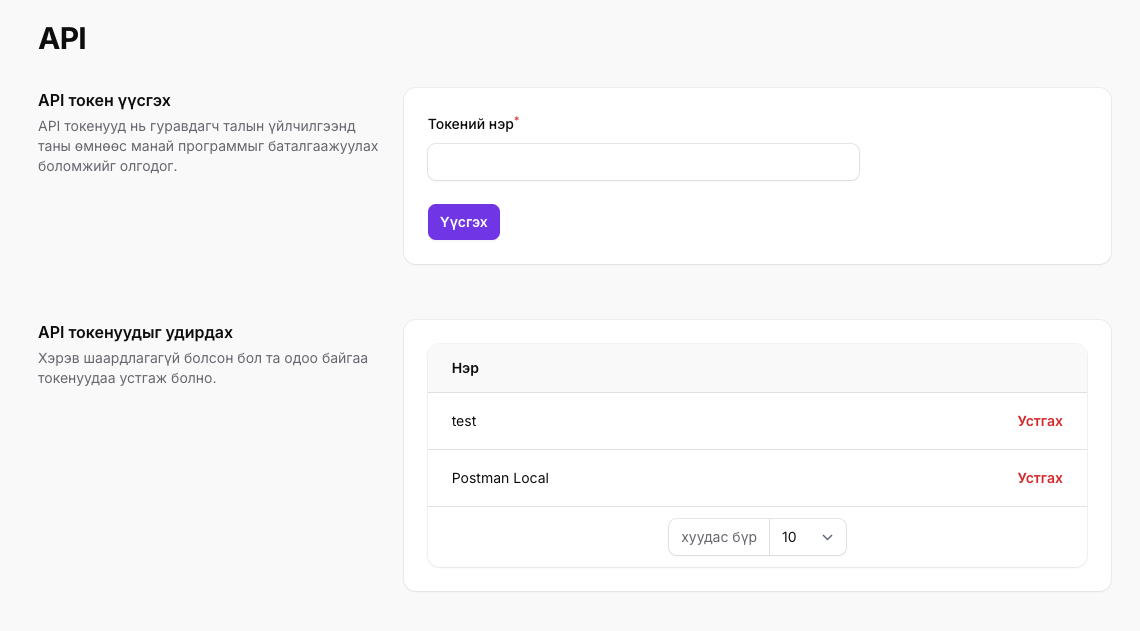
If a token is leaked or no longer needed, delete it from the same page to revoke it, then create a new one. A deleted token stops working immediately.
Token scope
Section titled “Token scope”A token created from a project’s page is valid in that project only:
- A request whose project ID is not the token’s project returns
403. - To work in another project, create a token from that project.
- Tokens created before August 2026 are not bound to a project and keep working across every project of the teams you belong to; the dashboard marks them as legacy — recreate them when you can.
Team token
Section titled “Team token”A platform team that opens projects for its clients creates a team token under the account-level API tokens menu (visible to the team owner). A team token:
- reaches the clients and projects API (
/v1/clients,/v1/projects); - also works on the project endpoints of every project of the team, yours and your clients’.
Teams that are not platform teams do not have this menu. A project token on the clients and projects API returns 403.
Calling the API with a token
Section titled “Calling the API with a token”Pass the token as Authorization: Bearer <token>. The example below creates a new invoice:
BYL_PROJECT_ID="your project ID"BYL_TOKEN="your API token"
curl -X POST https://byl.mn/api/v1/projects/$BYL_PROJECT_ID/invoices \    -H "Authorization: Bearer $BYL_TOKEN" \    -H 'Accept: application/json' \    -H 'Content-Type: application/json' \    -d '{ "amount": 1000, "description": "Test invoice" }'
The token identifies you, an invoice is created in the project, and the following response is returned:
{ "data": { "id": 3, "status": "open", "amount": 1000, "description": "Test invoice", "number": "DEMO-0011", "project_id": 1, "due_date": "2026-06-25T05:27:42.000000Z", "created_at": "2026-06-24T05:27:42.000000Z", "updated_at": "2026-06-24T05:27:42.000000Z", "url": "https://byl.mn/h/invoice/3/XN3GbRBxTslkMCeDj10CJtqlHiPfcmZ8" }}Common errors
Section titled “Common errors”If the token is missing, mistyped, or has been deleted, the API returns 401:
{ "message": "Unauthenticated."}Things to check:
- The
Bearerprefix and the space after it are present. - No whitespace or newlines were included when copying the token.
- The
Accept: application/jsonheader is set — otherwise errors may come back as HTML.
If the token is valid but you get 403, your user is not a member of that project’s team. See the API overview page for the full list of error codes.