

API overview
The Byl API lets you manage invoices, checkouts, customers, and subscriptions directly from your own system. The API follows REST principles, accepting and returning data as JSON.
Quick test
Section titled “Quick test”- Create a project API token.
- Copy your project ID.
- Run the request below, then open the
urlin the response to try the payment flow.
BYL_PROJECT_ID="your project ID"BYL_TOKEN="your API token"
curl -X POST https://byl.mn/api/v1/projects/$BYL_PROJECT_ID/invoices \ -H "Authorization: Bearer $BYL_TOKEN" \ -H 'Accept: application/json' \ -H 'Content-Type: application/json' \ -d '{ "amount": 1000, "description": "My first invoice" }'Base URL
Section titled “Base URL”All endpoints start with:
https://byl.mn/api/v1Authentication
Section titled “Authentication”Pass your API token in the Authorization header on every request:
Authorization: Bearer <your token>A token is created from a project’s page and is valid in that project only; calling another project’s endpoint returns 403. A platform team that opens projects for its clients creates a team token, valid across every project of the team, to call the clients and projects API. See the API token page for creating and revoking tokens.
If the token is missing or invalid, the API returns 401:
{ "message": "Unauthenticated."}Project ID
Section titled “Project ID”All project-scoped endpoints follow the /v1/projects/:id pattern. For example: GET /v1/projects/1, POST /v1/projects/1/invoices.
:id is your project’s number, shown on the project settings page in the dashboard.
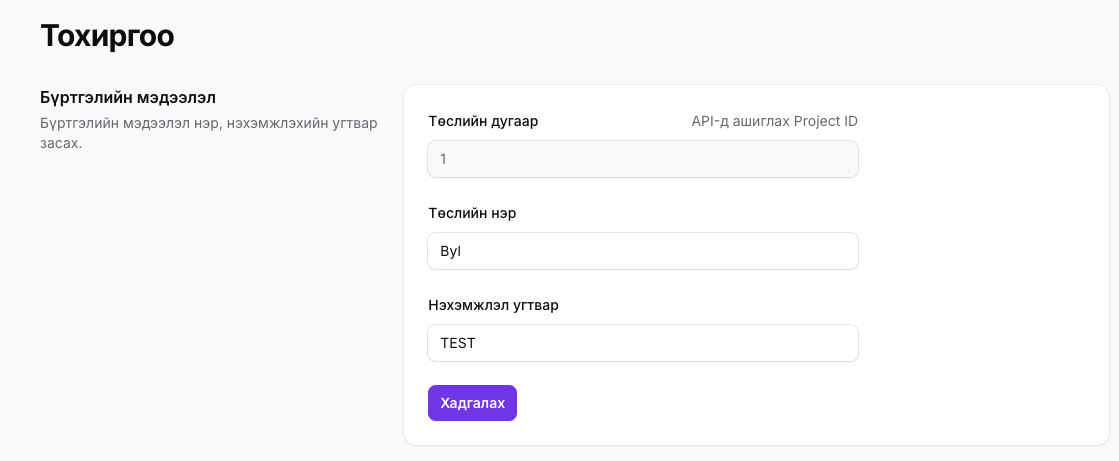
In all the examples below, replace $BYL_PROJECT_ID with this number.
Request format
Section titled “Request format”| Method | Usage |
|---|---|
GET |
Read data. Makes no changes. |
POST |
Create a resource, or perform an action (e.g. void an invoice). |
PUT |
Update existing data. |
DELETE |
Delete data. |
Send the request body as JSON, and always include these two headers:
Content-Type: application/jsonAccept: application/jsonResponses
Section titled “Responses”When a single object is returned, it is wrapped in a data field:
{ "data": { "id": 3, "status": "open", "amount": 1000, "description": "Миний эхний нэхэмжлэх", "project_id": 1, "created_at": "2026-06-24T05:27:42.000000Z", "updated_at": "2026-06-24T05:27:42.000000Z" }}For endpoints that return lists (for example, listing subscriptions), data is an array, accompanied by links and meta pagination information. Each page contains 25 records; fetch the next page with the ?page=2 parameter.
{ "data": [ /* ... */ ], "links": { "first": "https://byl.mn/api/v1/projects/1/subscriptions?page=1", "last": "https://byl.mn/api/v1/projects/1/subscriptions?page=3", "prev": null, "next": "https://byl.mn/api/v1/projects/1/subscriptions?page=2" }, "meta": { "current_page": 1, "last_page": 3, "per_page": 25, "total": 63 }}Errors
Section titled “Errors”| HTTP code | Description |
|---|---|
401 |
Token is missing, invalid, or has been revoked. |
403 |
You are not a member of the project’s team, or the team is suspended. |
404 |
The requested resource was not found (or belongs to another project). |
409 |
The action is not possible in the current state (e.g. canceling an already-canceled subscription). |
422 |
Validation error, or a business logic requirement was violated. |
503 |
Organization setup is incomplete, or the payment provider returned an error. |
5xx |
Error on Byl’s side. Retry the request. |
Validation errors
Section titled “Validation errors”If a parameter is invalid or missing, the response has a 422 code and an errors field:
{ "message": "The amount field is required.", "errors": { "amount": ["The amount field is required."] }}Business logic errors
Section titled “Business logic errors”If the parameters are valid but the action is not possible in the current state, the response has a 422 code with error and error_code fields:
{ "error": "invalid_invoice_state", "error_code": 405, "message": "Нэхэмжлэхийн төлөв буруу."}error_code is an internal Byl code and is unrelated to the HTTP status. We recommend branching on the error field rather than the code.
error |
error_code |
Description |
|---|---|---|
invalid_invoice_state |
405 | The invoice’s status does not allow this action (e.g. creating a payment on a paid invoice). |
inactive_payment_method_type |
402 | This payment method is not active for the project. |
invalid_payment_amount_for_pocket_driver |
407 | Payments via Pocket must be greater than ₮500. |
closed_checkout |
408 | The checkout is closed (paid or expired). |
checkout_cannot_be_edited |
403 | The checkout is in a state that cannot be edited. |
invoice_subscription_state |
406 | The subscription’s status does not allow this action. |
Organization setup errors
Section titled “Organization setup errors”If your project’s setup is incomplete, or the payment provider returns an error, the response has a 503 code in the same shape:
error |
error_code |
How to fix |
|---|---|---|
valid_subscription_required |
505 | An active Byl plan is required to operate in Live mode. |
missing_bank_account |
501 | Add a bank account to the business. |
missing_primary_bank_account |
502 | Make one of the business’s bank accounts the default. |
payment_method_error |
504 | Temporary error on the payment provider’s side — try again. |
Endpoint list
Section titled “Endpoint list”All paths below are prefixed with https://byl.mn/api/v1.
Invoices
Section titled “Invoices”| Method | Endpoint | Description |
|---|---|---|
POST |
/projects/:id/invoices |
Create an invoice |
GET |
/projects/:id/invoices/:invoice_id |
Retrieve an invoice |
POST |
/projects/:id/invoices/:invoice_id/void |
Void an invoice |
DELETE |
/projects/:id/invoices/:invoice_id |
Delete an invoice |
Checkout
Section titled “Checkout”| Method | Endpoint | Description |
|---|---|---|
POST |
/projects/:id/checkouts |
Create a checkout |
GET |
/projects/:id/checkouts/:checkout_id |
Retrieve a checkout |
Customers
Section titled “Customers”| Method | Endpoint | Description |
|---|---|---|
POST |
/projects/:id/customers |
Create a customer |
GET |
/projects/:id/customers/:customer_id |
Retrieve a customer |
GET |
/projects/:id/customers/by-client-reference-id/:ref |
Retrieve by your own ID |
Subscriptions
Section titled “Subscriptions”| Method | Endpoint | Description |
|---|---|---|
GET |
/projects/:id/subscriptions |
List subscriptions |
POST |
/projects/:id/subscriptions |
Start a trial |
GET |
/projects/:id/subscriptions/:subscription_id |
Retrieve a subscription |
POST |
/projects/:id/subscriptions/:subscription_id/cancel |
Cancel |
POST |
/projects/:id/subscriptions/:subscription_id/resume |
Resume a canceled subscription |
Billing portal
Section titled “Billing portal”| Method | Endpoint | Description |
|---|---|---|
POST |
/projects/:id/billing-portal/sessions |
Create a portal session |
Next steps
Section titled “Next steps”- API token — create a token and send your first request
- Webhook — receive payment notifications in your own system
- Laravel SDK — integrate without calling the API directly if you use Laravel