

Checkout
Checkout is Byl’s hosted payment page for handling a complete purchase — products, quantities, and discounts included.
When a customer clicks “Buy” in your app or on your website, you create a checkout and redirect them to the url returned in the response. From there, Byl handles everything: choosing a payment method, applying promotion codes, collecting a delivery address and phone number, and emailing the receipt.
As soon as the checkout is paid, a checkout.completed event is delivered via webhook.
How it works
Section titled “How it works”Customer clicks "Buy" │ ▼Your server calls POST /checkouts │ the response contains id and url ▼Redirect the customer to the url │ they pay on Byl's hosted page ▼Customer returns to success_url + you receive a checkout.completed webhookWe recommend fulfilling orders (shipping goods, granting access) from the webhook rather than the success_url — the customer may close the page before returning.
Statuses
Section titled “Statuses”| Status | Description |
|---|---|
open |
Awaiting payment. |
pending |
The customer reported a bank transfer; waiting for the merchant to verify it. The checkout is locked. |
complete |
Paid. The checkout.completed webhook has been sent. |
expired |
Expired. Can no longer be paid. |
By default, a checkout expires after 2 months (expires_at). Plan-change checkouts are the exception — they expire after 24 hours (see why).
The Checkout object
Section titled “The Checkout object”| Field | Type | Description |
|---|---|---|
id |
Number | Checkout ID. |
url |
String | The payment page to show the customer. |
status |
String | Status: open, pending, complete, expired. |
mode |
String | Purchase mode: payment, subscription. |
amount_subtotal |
Number | Total of all items (before discounts). |
amount_total |
Number | Total the customer pays (after discounts). |
client_reference_id |
String | The order reference in your system. |
customer_id |
Number | ID of the associated customer. |
customer_email |
String | The customer’s email address. |
is_guest |
Boolean | Whether this is a guest checkout (no customer attached). |
allow_promotion_codes |
Boolean | Whether the promotion code field is enabled. |
custom_fields |
Array | The custom fields with the customer’s answers (value). |
expires_at |
Date | When the checkout expires. |
created_at |
Date | When the checkout was created. |
updated_at |
Date | When the checkout was last updated. |
Create a checkout
Section titled “Create a checkout”POST /v1/projects/:project_id/checkouts| Parameter | Type | Required | Description |
|---|---|---|---|
items[] |
Array | true | List of items. At least 1. |
success_url |
String | false | Where to send the customer after a successful payment. |
cancel_url |
String | false | Where to send the customer if they cancel the purchase. |
customer_id |
Number | false | Customer ID. Required for checkouts with a recurring price. |
customer_email |
String | false | The customer’s email address. If provided, a customer is created and attached automatically. |
client_reference_id |
String | false | A reference from your system. Up to 48 characters. |
phone_number_collection |
Boolean | false | Enable phone number collection. |
email_collection |
Boolean | false | Email collection field. Defaults to true — set to false to stop requiring an email on the payment page. Without an email, no receipt is sent. |
delivery_address_collection |
Boolean | false | Enable delivery address collection. |
allow_promotion_codes |
Boolean | false | Enable the promotion code field. |
custom_fields[] |
Array | false | Custom fields to ask the customer. Up to 3. |
discounts[] |
Array | false | Direct discounts. |
subscription_id |
Number | false | ID of the subscription to renew or change plans on. |
The response contains only the id and url:
{ "data": { "id": 13338, "url": "https://byl.mn/h/checkout/13338/Yi7smBuk" }}Specifying items
Section titled “Specifying items”There are three ways to specify a product in items[]. Use exactly one per item.
| Method | When to use |
|---|---|
price |
Recommended. Reference a price registered in Byl by a memorable name (lookup key). |
price_id |
Reference a price registered in Byl by its ID. Same as price, but requires remembering the ID. |
price_data |
Pass the price and name of a product not registered in Byl inline in the request (dynamic pricing, shopping carts, etc.). |
price (lookup key)
Section titled “price (lookup key)”A lookup key is a name you give a price that is unique within your project (e.g. starter_monthly). Set it in the price section of the product edit page in the dashboard.
| Parameter | Type | Required | Description |
|---|---|---|---|
items[0][price] |
String | true | The price’s lookup key. E.g. starter_monthly. |
items[0][quantity] |
Number | true | Quantity. At least 1. |
BYL_PROJECT_ID="your project ID"BYL_TOKEN="your API token"
curl -X POST https://byl.mn/api/v1/projects/$BYL_PROJECT_ID/checkouts \    -H "Authorization: Bearer $BYL_TOKEN" \    -H 'Accept: application/json' \    -H 'Content-Type: application/json' \    -d '{          "success_url": "https://example.mn/purchase/success",          "items": [              { "price": "starter_monthly", "quantity": 1 }          ]      }'
Passing a lookup key that does not exist in the project returns a validation error.
price_id
Section titled “price_id”The ID of a price registered in Byl. Each price’s ID is shown on the product detail page in the dashboard.
| Parameter | Type | Required | Description |
|---|---|---|---|
items[0][price_id] |
Number | true | The ID of a price registered in Byl. |
items[0][quantity] |
Number | true | Quantity. |
curl -X POST https://byl.mn/api/v1/projects/$BYL_PROJECT_ID/checkouts \ -H "Authorization: Bearer $BYL_TOKEN" \ -H 'Accept: application/json' \ -H 'Content-Type: application/json' \ -d '{ "success_url": "https://example.mn/purchase/success", "items": [ { "price_id": 3, "quantity": 1 } ] }'price_data
Section titled “price_data”Define a product not registered in Byl inline in the request. Useful for dynamic pricing (e.g. shopping cart contents, metered services).
| Parameter | Type | Required | Description |
|---|---|---|---|
items[0][price_data][unit_amount] |
Number | true | Unit price. |
items[0][price_data][product_data][name] |
String | true | Product name. Up to 255 characters. |
items[0][price_data][product_data][client_reference_id] |
String | false | The product’s ID in your system. |
items[0][quantity] |
Number | true | Quantity. |
curl -X POST https://byl.mn/api/v1/projects/$BYL_PROJECT_ID/checkouts \ -H "Authorization: Bearer $BYL_TOKEN" \ -H 'Accept: application/json' \ -H 'Content-Type: application/json' \ -d '{ "success_url": "https://example.mn/purchase/success", "items": [ { "price_data": { "unit_amount": 1000, "product_data": { "name": "Product 1" } }, "quantity": 1 } ] }'Letting customers adjust quantities
Section titled “Letting customers adjust quantities”An extra setting that works the same with all three methods above. When enabled, the customer can change the quantity themselves on the checkout page.
| Parameter | Type | Required | Description |
|---|---|---|---|
items[0][adjustable_quantity][enabled] |
Boolean | true | Enable quantity adjustment. |
items[0][adjustable_quantity][min] |
Number | false | The minimum quantity allowed. |
items[0][adjustable_quantity][max] |
Number | false | The maximum quantity allowed. |
{ "items": [ { "price": "tshirt", "quantity": 1, "adjustable_quantity": { "enabled": true, "min": 1, "max": 10 } } ]}Discounts
Section titled “Discounts”Use discounts[] to subtract a fixed amount directly from the total. You decide the reason for the discount and write a description the customer will see.
| Parameter | Type | Required | Description |
|---|---|---|---|
discounts[0][amount] |
Number | true | The discount amount. |
discounts[0][description] |
String | true | Description shown to the customer. Up to 255 characters. |
The total discount amount cannot exceed the items subtotal.
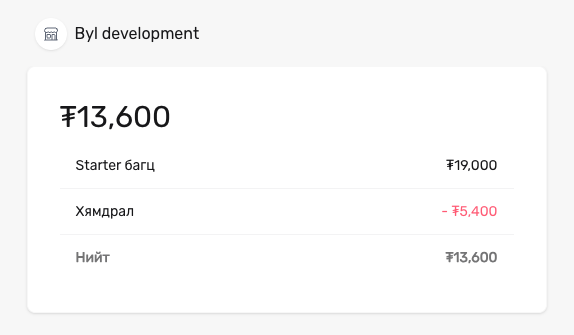
curl -X POST https://byl.mn/api/v1/projects/$BYL_PROJECT_ID/checkouts \ -H "Authorization: Bearer $BYL_TOKEN" \ -H 'Accept: application/json' \ -H 'Content-Type: application/json' \ -d '{ "items": [ { "price_id": 3, "quantity": 1 } ], "discounts": [ { "amount": 5400, "description": "Discount" } ] }'In this example, a discount of ₮5,400 appears with the description “Discount”:
Custom fields
Section titled “Custom fields”Use custom_fields[] to ask your own questions on the payment page — a company name, a VAT number, a seat type. A checkout takes up to 3 fields; the customer fills them in after the email and phone fields.
| Parameter | Type | Required | Description |
|---|---|---|---|
custom_fields[0][label] |
String | true | The question as the customer sees it. Up to 100 characters. |
custom_fields[0][type] |
String | true | text (up to 255 characters), numeric (digits only), dropdown. |
custom_fields[0][key] |
String | false | Identifies the answer: a-z, 0-9, _, up to 50 characters. Derived from label when omitted. |
custom_fields[0][optional] |
Boolean | false | true lets the customer leave it blank. Defaults to false. |
custom_fields[0][dropdown][options][] |
Array | for dropdown | 1–50 options, each with a label (required) and a value (derived from label when omitted). |
curl -X POST https://byl.mn/api/v1/projects/$BYL_PROJECT_ID/checkouts \ -H "Authorization: Bearer $BYL_TOKEN" \ -H 'Accept: application/json' \ -H 'Content-Type: application/json' \ -d '{ "items": [ { "price_id": 3, "quantity": 1 } ], "custom_fields": [ { "key": "company", "label": "Company name", "type": "text" }, { "key": "vat", "label": "VAT number", "type": "numeric", "optional": true }, { "key": "seat", "label": "Seat", "type": "dropdown", "dropdown": { "options": [{ "label": "VIP" }, { "label": "Regular" }] } } ] }'The answers come back in each field’s value — in the retrieve response and in the checkout.completed webhook’s custom_fields array. A dropdown’s value is the option’s value (e.g. “VIP” → vip); a field left blank has a null value.
Promotion codes
Section titled “Promotion codes”Pass allow_promotion_codes: true to show a promotion code field on the checkout page. When the customer enters a code, the discount is applied automatically.
Promotion codes are created in the dashboard. There are two types, each with different requirements for the checkout:
| Code type | How items must be specified |
|---|---|
| Discount off the order total | Any method — price, price_id, and price_data all work. |
| Product discount | Every item must use price or price_id. |
Product discount codes are tied to specific products registered in Byl. Products passed via price_data are not registered in the system, so it cannot determine which discount applies to them.
curl -X POST https://byl.mn/api/v1/projects/$BYL_PROJECT_ID/checkouts \ -H "Authorization: Bearer $BYL_TOKEN" \ -H 'Accept: application/json' \ -H 'Content-Type: application/json' \ -d '{ "success_url": "https://example.mn/purchase/success", "allow_promotion_codes": true, "items": [ { "price_id": 3, "quantity": 1 }, { "price_id": 5, "quantity": 2 } ] }'Read more on the Promotion codes page.
Recurring payments (subscriptions)
Section titled “Recurring payments (subscriptions)”When a checkout with a recurring price (monthly or yearly cycle) is paid, a subscription is created automatically. In this case, two extra requirements apply:
customer_idis required — the subscription is registered to a specific customer.- A single item — a checkout with a recurring price cannot contain any other items.
Read about renewals, plan changes, and trials on the Subscriptions page.
Retrieve a checkout
Section titled “Retrieve a checkout”GET /v1/projects/:project_id/checkouts/:checkout_idExample request
curl -X GET https://byl.mn/api/v1/projects/$BYL_PROJECT_ID/checkouts/13338 \ -H "Authorization: Bearer $BYL_TOKEN" \ -H 'Accept: application/json'Example response
{ "data": { "id": 13338, "url": "https://byl.mn/h/checkout/13338/Yi7smBuk", "client_reference_id": null, "mode": "payment", "status": "open", "expires_at": "2026-12-25T16:00:00.000000Z", "amount_subtotal": 1000, "amount_total": 1000, "customer_id": null, "customer_email": null, "is_guest": true, "allow_promotion_codes": false, "created_at": "2026-10-25T10:27:49.000000Z", "updated_at": "2026-10-25T10:27:49.000000Z" }}Next steps
Section titled “Next steps”- Webhook — receive the
checkout.completedevent in your system - Promotion codes — create codes and configure discounts
- Subscriptions — recurring payments