

Checkout
Checkout is Byl's hosted payment page for handling a complete purchase — products, quantities, and discounts included.
When a customer clicks "Buy" in your app or on your website, you create a checkout and redirect them to the url returned in the response. From there, Byl handles everything: choosing a payment method, applying promotion codes, collecting a delivery address and phone number, and emailing the receipt.
As soon as the checkout is paid, a checkout.completed event is delivered via webhook.
Invoice vs Checkout
If you only need to collect a specific amount, an invoice is simpler. Use a checkout when you need products, quantities, promotion codes, or delivery addresses.
How it works
Customer clicks "Buy"
  │
  ▼
Your server calls POST /checkouts
  │ the response contains id and url
  ▼
Redirect the customer to the url
  │ they pay on Byl's hosted page
  ▼
Customer returns to success_url  +  you receive a checkout.completed webhook
We recommend fulfilling orders (shipping goods, granting access) from the webhook rather than the success_url — the customer may close the page before returning.
Statuses
| Status | Description |
|---|---|
open | Awaiting payment. |
pending | The customer reported a bank transfer; waiting for the merchant to verify it. The checkout is locked. |
complete | Paid. The checkout.completed webhook has been sent. |
expired | Expired. Can no longer be paid. |
By default, a checkout expires after 2 months (expires_at). Plan-change checkouts are the exception — they expire after 24 hours (see why).
The Checkout object
| Field | Type | Description |
|---|---|---|
id | Number | Checkout ID. |
url | String | The payment page to show the customer. |
status | String | Status: open, pending, complete, expired. |
mode | String | Purchase mode: payment, subscription. |
amount_subtotal | Number | Total of all items (before discounts). |
amount_total | Number | Total the customer pays (after discounts). |
client_reference_id | String | The order reference in your system. |
customer_id | Number | ID of the associated customer. |
customer_email | String | The customer's email address. |
is_guest | Boolean | Whether this is a guest checkout (no customer attached). |
allow_promotion_codes | Boolean | Whether the promotion code field is enabled. |
custom_fields | Array | The custom fields with the customer's answers (value). |
expires_at | Date | When the checkout expires. |
created_at | Date | When the checkout was created. |
updated_at | Date | When the checkout was last updated. |
Create a checkout
POST /v1/projects/:project_id/checkouts| Parameter | Type | Required | Description |
|---|---|---|---|
items[] | Array | true | List of items. At least 1. |
success_url | String | false | Where to send the customer after a successful payment. |
cancel_url | String | false | Where to send the customer if they cancel the purchase. |
customer_id | Number | false | Customer ID. Required for checkouts with a recurring price. |
customer_email | String | false | The customer's email address. If provided, a customer is created and attached automatically. |
client_reference_id | String | false | A reference from your system. Up to 48 characters. |
phone_number_collection | Boolean | false | Enable phone number collection. |
email_collection | Boolean | false | Email collection field. Defaults to true — set to false to stop requiring an email on the payment page. Without an email, no receipt is sent. |
delivery_address_collection | Boolean | false | Enable delivery address collection. |
allow_promotion_codes | Boolean | false | Enable the promotion code field. |
custom_fields[] | Array | false | Custom fields to ask the customer. Up to 3. |
discounts[] | Array | false | Direct discounts. |
subscription_id | Number | false | ID of the subscription to renew or change plans on. |
The response contains only the id and url:
{
  "data": {
    "id": 13338,
    "url": "https://byl.mn/h/checkout/13338/Yi7smBuk"
  }
}
Specifying items
There are three ways to specify a product in items[]. Use exactly one per item.
| Method | When to use |
|---|---|
price | Recommended. Reference a price registered in Byl by a memorable name (lookup key). |
price_id | Reference a price registered in Byl by its ID. Same as price, but requires remembering the ID. |
price_data | Pass the price and name of a product not registered in Byl inline in the request (dynamic pricing, shopping carts, etc.). |
WARNING
To use product-level promotion codes or subscriptions, the product must be registered in Byl — use price or price_id. These features do not work with price_data.
price (lookup key)
A lookup key is a name you give a price that is unique within your project (e.g. starter_monthly). Set it in the price section of the product edit page in the dashboard.
| Parameter | Type | Required | Description |
|---|---|---|---|
items[0][price] | String | true | The price's lookup key. E.g. starter_monthly. |
items[0][quantity] | Number | true | Quantity. At least 1. |
BYL_PROJECT_ID="your project ID"
BYL_TOKEN="your API token"

curl -X POST https://byl.mn/api/v1/projects/$BYL_PROJECT_ID/checkouts \
    -H "Authorization: Bearer $BYL_TOKEN" \
    -H 'Accept: application/json' \
    -H 'Content-Type: application/json' \
    -d '{
          "success_url": "https://example.mn/purchase/success",
          "items": [
              { "price": "starter_monthly", "quantity": 1 }
          ]
      }'
Passing a lookup key that does not exist in the project returns a validation error.
price_id
The ID of a price registered in Byl. Each price's ID is shown on the product detail page in the dashboard.
| Parameter | Type | Required | Description |
|---|---|---|---|
items[0][price_id] | Number | true | The ID of a price registered in Byl. |
items[0][quantity] | Number | true | Quantity. |
curl -X POST https://byl.mn/api/v1/projects/$BYL_PROJECT_ID/checkouts \
    -H "Authorization: Bearer $BYL_TOKEN" \
    -H 'Accept: application/json' \
    -H 'Content-Type: application/json' \
    -d '{
          "success_url": "https://example.mn/purchase/success",
          "items": [
              { "price_id": 3, "quantity": 1 }
          ]
      }'
price_data
Define a product not registered in Byl inline in the request. Useful for dynamic pricing (e.g. shopping cart contents, metered services).
| Parameter | Type | Required | Description |
|---|---|---|---|
items[0][price_data][unit_amount] | Number | true | Unit price. |
items[0][price_data][product_data][name] | String | true | Product name. Up to 255 characters. |
items[0][price_data][product_data][client_reference_id] | String | false | The product's ID in your system. |
items[0][quantity] | Number | true | Quantity. |
curl -X POST https://byl.mn/api/v1/projects/$BYL_PROJECT_ID/checkouts \
    -H "Authorization: Bearer $BYL_TOKEN" \
    -H 'Accept: application/json' \
    -H 'Content-Type: application/json' \
    -d '{
          "success_url": "https://example.mn/purchase/success",
          "items": [
              {
                  "price_data": {
                      "unit_amount": 1000,
                      "product_data": { "name": "Product 1" }
                  },
                  "quantity": 1
              }
          ]
      }'
Letting customers adjust quantities
An extra setting that works the same with all three methods above. When enabled, the customer can change the quantity themselves on the checkout page.
| Parameter | Type | Required | Description |
|---|---|---|---|
items[0][adjustable_quantity][enabled] | Boolean | true | Enable quantity adjustment. |
items[0][adjustable_quantity][min] | Number | false | The minimum quantity allowed. |
items[0][adjustable_quantity][max] | Number | false | The maximum quantity allowed. |
{
  "items": [
    {
      "price": "tshirt",
      "quantity": 1,
      "adjustable_quantity": { "enabled": true, "min": 1, "max": 10 }
    }
  ]
}
Discounts
Use discounts[] to subtract a fixed amount directly from the total. You decide the reason for the discount and write a description the customer will see.
| Parameter | Type | Required | Description |
|---|---|---|---|
discounts[0][amount] | Number | true | The discount amount. |
discounts[0][description] | String | true | Description shown to the customer. Up to 255 characters. |
The total discount amount cannot exceed the items subtotal.
curl -X POST https://byl.mn/api/v1/projects/$BYL_PROJECT_ID/checkouts \
    -H "Authorization: Bearer $BYL_TOKEN" \
    -H 'Accept: application/json' \
    -H 'Content-Type: application/json' \
    -d '{
          "items": [
              { "price_id": 3, "quantity": 1 }
          ],
          "discounts": [
              { "amount": 5400, "description": "Discount" }
          ]
      }'
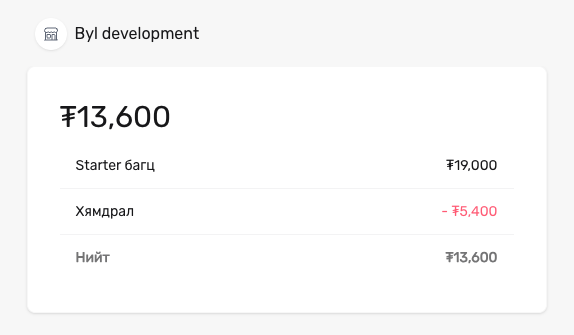
In this example, a discount of ₮5,400 appears with the description "Discount":
Discounts vs Promotion codes
discounts[] directly subtracts a discount you calculated. A promotion code lets the customer enter a code themselves to receive a discount. You can use both at the same time.
Custom fields
Use custom_fields[] to ask your own questions on the payment page — a company name, a VAT number, a seat type. A checkout takes up to 3 fields; the customer fills them in after the email and phone fields.
| Parameter | Type | Required | Description |
|---|---|---|---|
custom_fields[0][label] | String | true | The question as the customer sees it. Up to 100 characters. |
custom_fields[0][type] | String | true | text (up to 255 characters), numeric (digits only), dropdown. |
custom_fields[0][key] | String | false | Identifies the answer: a-z, 0-9, _, up to 50 characters. Derived from label when omitted. |
custom_fields[0][optional] | Boolean | false | true lets the customer leave it blank. Defaults to false. |
custom_fields[0][dropdown][options][] | Array | for dropdown | 1–50 options, each with a label (required) and a value (derived from label when omitted). |
curl -X POST https://byl.mn/api/v1/projects/$BYL_PROJECT_ID/checkouts \
    -H "Authorization: Bearer $BYL_TOKEN" \
    -H 'Accept: application/json' \
    -H 'Content-Type: application/json' \
    -d '{
          "items": [
              { "price_id": 3, "quantity": 1 }
          ],
          "custom_fields": [
              { "key": "company", "label": "Company name", "type": "text" },
              { "key": "vat", "label": "VAT number", "type": "numeric", "optional": true },
              {
                  "key": "seat",
                  "label": "Seat",
                  "type": "dropdown",
                  "dropdown": { "options": [{ "label": "VIP" }, { "label": "Regular" }] }
              }
          ]
      }'
The answers come back in each field's value — in the retrieve response and in the checkout.completed webhook's custom_fields array. A dropdown's value is the option's value (e.g. "VIP" → vip); a field left blank has a null value.
Promotion codes
Pass allow_promotion_codes: true to show a promotion code field on the checkout page. When the customer enters a code, the discount is applied automatically.
Promotion codes are created in the dashboard. There are two types, each with different requirements for the checkout:
| Code type | How items must be specified |
|---|---|
| Discount off the order total | Any method — price, price_id, and price_data all work. |
| Product discount | Every item must use price or price_id. |
Product discount codes are tied to specific products registered in Byl. Products passed via price_data are not registered in the system, so it cannot determine which discount applies to them.
curl -X POST https://byl.mn/api/v1/projects/$BYL_PROJECT_ID/checkouts \
    -H "Authorization: Bearer $BYL_TOKEN" \
    -H 'Accept: application/json' \
    -H 'Content-Type: application/json' \
    -d '{
          "success_url": "https://example.mn/purchase/success",
          "allow_promotion_codes": true,
          "items": [
              { "price_id": 3, "quantity": 1 },
              { "price_id": 5, "quantity": 2 }
          ]
      }'
Read more on the Promotion codes page.
Recurring payments (subscriptions)
When a checkout with a recurring price (monthly or yearly cycle) is paid, a subscription is created automatically. In this case, two extra requirements apply:
customer_idis required — the subscription is registered to a specific customer.- A single item — a checkout with a recurring price cannot contain any other items.
Read about renewals, plan changes, and trials on the Subscriptions page.
Retrieve a checkout
GET /v1/projects/:project_id/checkouts/:checkout_idTIP
There is no need to poll this endpoint to find out whether a checkout has been paid — set up a webhook and the checkout.completed event will be delivered to you immediately.
Example request
curl -X GET https://byl.mn/api/v1/projects/$BYL_PROJECT_ID/checkouts/13338 \
    -H "Authorization: Bearer $BYL_TOKEN" \
    -H 'Accept: application/json'
Example response
{
  "data": {
    "id": 13338,
    "url": "https://byl.mn/h/checkout/13338/Yi7smBuk",
    "client_reference_id": null,
    "mode": "payment",
    "status": "open",
    "expires_at": "2026-12-25T16:00:00.000000Z",
    "amount_subtotal": 1000,
    "amount_total": 1000,
    "customer_id": null,
    "customer_email": null,
    "is_guest": true,
    "allow_promotion_codes": false,
    "created_at": "2026-10-25T10:27:49.000000Z",
    "updated_at": "2026-10-25T10:27:49.000000Z"
  }
}
Next steps
- Webhook — receive the
checkout.completedevent in your system - Promotion codes — create codes and configure discounts
- Subscriptions — recurring payments